💬
xxSOP - How to Measure on a Metallic Surface
Document Classification: Confidential
Reference: SOP-INX-01
Owner: Gerardo Cerros Version: 1.0
Approved by: Lisandro Robles Approval date: 10.21.2025
Areas covered by the procedure:
Purpose
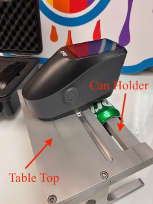
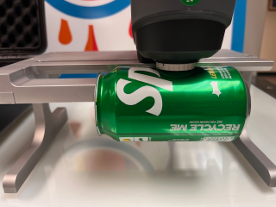
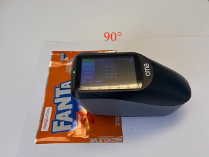
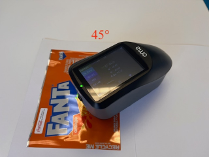
This SOP outlines the procedure for using a spectrophotometer to measure the colors printed on metal cans for color control. The measurements will be taken on the flat sample and if possible, at three different angles (0°, 45°, and 90°) and averaged to ensure accuracy, OR the measurement can be taken directly on cylindrical can (straight wall or necked can) using a Tabletop, and if possible at three different points (top – mid – bottom).
Scope
This procedure applies to all personnel responsible for color quality control in the printing process on metal cans.
Equipment and Materials:
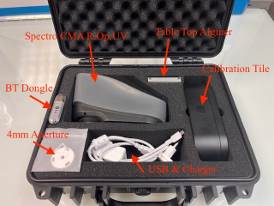
- Spherical Spectrophotometer + Tabletop for cans (Model: CMA R.Op.UV or X-rite Ci6x)
- Metal cans with printed colors
- Cleaning cloth (lint-free)
- Calibration tile (provided by the spectrophotometer manufacturer)
Procedure
Preparation
- Ensure the spectrophotometer is calibrated according to the manufacturer's instructions using the calibration tile.
- Clean the surface of the metal can with a lint-free cloth to remove any dust, fingerprints, or other contaminants.
Measurement Setup
- Turn on the spectrophotometer and allow it to warm up or to be at room temperature.
- Set the spectrophotometer to the appropriate measurement mode for metal surfaces.
- Illuminant D50 and Observer Angle at 2°
- SCI/SCE (Specular Component Included AND Specular Component Excluded)
- Define on the software or the Spectro the number of measurements to average
- Aperture 8mm or 4mm, depending on the measurement surface.
Taking Measurements
- Position the spectrophotometer at a 90° angle relative to (“stamping direction”) the surface of the metal can.
- Ensure the measurement aperture is in full contact with the can surface to avoid any light leakage.
- Automatic Record the measurement made by the software.
- If required: Repeat the measurement at a 45° and 90° angle.
- Rotate the spectrophotometer or the can as necessary to achieve the measurement angle.
- Ensure the measurement aperture is in full contact with the can surface.
- Use the spectrophotometer's software to compute the average
- Automatic Record the measurement made by the software.
Cleaning and Maintenance
- After completing the measurements, clean the spectrophotometer’s measurement aperture with a lint-free cloth.
- Store the spectrophotometer in a its original case, dry place as per the manufacturer’s recommendations.
Safety and Quality Control
- Always handle the spectrophotometer and metal cans with care to prevent damage.
- Ensure the work area is clean and free from contaminants that may affect the accuracy of the measurements.
- Regularly check the calibration of the spectrophotometer to maintain measurement accuracy.
Troubleshooting
- If the spectrophotometer gives inconsistent readings, recalibrate the device and repeat the measurements.
- If the measurements are still inconsistent, inspect the spectrophotometer and the metal can for any damage or contamination.
- Control Spectro last revision date as per manufacturer requirements.
Images